Why Developers Still Debug ASCII Data in 2026
Understanding why a 60-year-old character encoding still plays a critical role in debugging APIs, network packets, and system logs.


In an era dominated by Unicode, UTF-8, cloud-native systems, and AI-driven development, it might seem strange that developers still deal with a character encoding standard created more than 60 years ago. ASCII, originally standardized in 1963, predates the modern internet, yet it continues to appear in debugging sessions across backend systems, APIs, network protocols, and embedded devices.
Many developers assume ASCII is obsolete because modern software relies heavily on Unicode and UTF-8 to support global languages. However, ASCII has never truly disappeared. Instead, it remains the foundation layer for many modern text-based systems.
In practice, developers still debug ASCII data because it represents the lowest common denominator of digital text communication. When data becomes corrupted, encoded strangely, or transmitted in raw numeric form, ASCII often becomes the most reliable way to inspect what is actually happening under the hood.
Understanding ASCII is not just about learning an old encoding system. It is about learning how computers represent text at the most fundamental level — a skill that makes debugging, networking, and system analysis significantly easier.
A Quick Refresher: What ASCII Actually Is
ASCII stands for American Standard Code for Information Interchange. It is a character encoding standard that maps numbers to characters, allowing computers to represent text in a consistent way.
ASCII uses a 7-bit encoding system, which means it can represent 128 unique characters.
These characters include:
Uppercase letters
Lowercase letters
Numbers
Punctuation symbols
Control characters used for formatting
For example:
72 101 108 108 111When these ASCII codes are converted back to characters, they become:
HelloEach number represents the decimal ASCII value of a character.
If you’re working with encoded ASCII values while debugging APIs or logs, you can quickly decode them using an ascii to text converter to understand what the data actually represents.
For example:
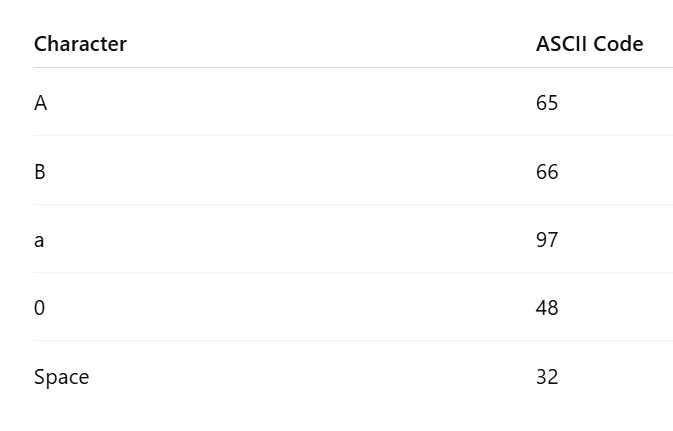
Even though ASCII itself is limited to 128 characters, its structure became the basis for modern encoding systems, including Unicode and UTF-8.
ASCII vs Unicode vs UTF-8
Many developers believe ASCII is outdated because most applications today use UTF-8 encoding. However, an important detail is often overlooked:
The first 128 characters of UTF-8 are identical to ASCII.
This means any ASCII text is also valid UTF-8 text.
For example:
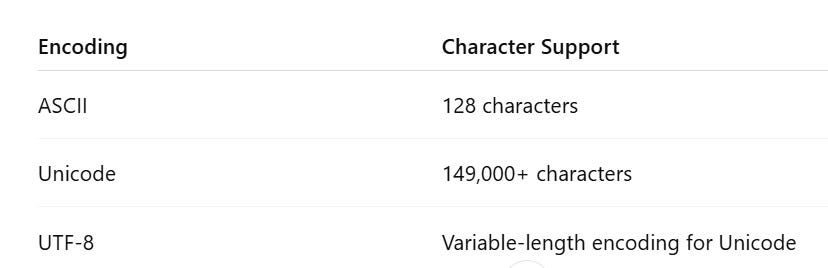
Because UTF-8 was designed to remain backward compatible with ASCII, the majority of English text and protocol data still appears as plain ASCII bytes.
This compatibility is one of the main reasons ASCII still appears frequently in debugging scenarios.
Also Read: The Best Lightweight SQL Editors for Quick Edits (2026 Edition)
Why ASCII Still Appears in Modern Software Systems
Even in 2026, many critical systems still rely on ASCII-compatible text formats.
This is not because ASCII is modern or powerful. It is because ASCII is simple, predictable, and universally supported.
Several major areas of software development still depend heavily on ASCII-based structures.
Network Protocols Still Use ASCII
Many internet protocols were designed around human-readable text formats. These formats rely heavily on ASCII characters.
Examples include:
HTTP
SMTP
FTP
DNS
IRC
A typical HTTP request looks like this:
GET /index.html HTTP/1.1
Host: example.com
User-Agent: Mozilla
Every character in that request is ASCII-compatible.
This design decision was intentional. Early internet engineers wanted protocols that were easy to debug manually using simple tools like telnet or netcat.
Even today, when inspecting network traffic with tools like Wireshark or tcpdump, developers frequently see ASCII-based payloads embedded within packets.
Logs and Debug Output
Most server logs and debugging output rely on ASCII-compatible text formats.
Examples include:
web server logs
application error logs
container logs
CI/CD logs
system diagnostics
A typical log entry might look like this:
2026-04-12 10:32:11 ERROR Invalid token receivedThese logs are stored as ASCII-compatible text because ASCII provides:
high readability
simple parsing
universal compatibility
When debugging production systems, developers often inspect raw log data, where ASCII characters remain the easiest format to interpret.
Embedded Systems and IoT Devices
ASCII is extremely common in embedded systems and microcontroller environments.
Many embedded devices communicate through serial interfaces where ASCII text is transmitted as diagnostic output.
For example, a microcontroller might output:
TEMP=24.3
STATUS=OK
MODE=ACTIVE
Engineers debugging hardware systems often connect to devices using serial monitors, where ASCII output makes diagnostics easy to read.
Binary encodings would make this process far more difficult.
APIs and Text-Based Data Formats
Many data formats used by modern APIs remain ASCII-compatible.
Examples include:
JSON
{”status”:”success”}CSV
name,age
Alice,29
Plain text protocols are still widely used because they are:
lightweight
easy to parse
human readable
When something breaks during data parsing, developers frequently inspect the raw ASCII representation of the payload.
Real Debugging Scenarios Where ASCII Matters
ASCII debugging is not just theoretical. It appears in real-world engineering workflows every day.
Debugging Corrupted API Payloads
Sometimes APIs return unexpected numeric values instead of readable text.
For example, a payload may appear as:
72 101 108 108 111Instead of:
HelloThis often happens when:
encoding mismatches occur
data serialization fails
incorrect decoding is applied
Developers must convert ASCII codes back into readable text to understand what the system actually transmitted.
Inspecting Network Packets
Network engineers and backend developers often inspect packet-level traffic using tools like:
Wireshark
tcpdump
network sniffers
Within packet payloads, ASCII segments frequently appear.
For example:
POST /login HTTP/1.1
Content-Type: application/json
Being able to quickly recognize ASCII sequences helps developers identify:
malformed requests
incorrect headers
corrupted payloads
Reverse Engineering Legacy Systems
Many enterprise systems built decades ago still rely on ASCII-based data formats.
These systems may transmit messages like:
65 67 75When converted to ASCII text, this becomes:
ACKWhich represents an acknowledgment signal.
Developers maintaining legacy infrastructure often need to decode these numeric ASCII sequences to understand system communication.
Debugging Encoding Issues
Encoding errors are one of the most common sources of bugs in distributed systems.
Typical symptoms include:
garbled characters
unreadable payloads
parsing failures
corrupted API responses
A developer might encounter something like:
éinstead of:
éIn such cases, examining the underlying ASCII or byte values helps identify whether the issue originates from:
incorrect encoding
incorrect decoding
character set mismatch
ASCII inspection often reveals the exact point where the data transformation failed.
Common ASCII Debugging Mistakes Developers Make
Even experienced developers sometimes misinterpret ASCII data.
Assuming Everything Uses UTF-8
Although UTF-8 is the dominant encoding today, many legacy systems still operate using ASCII or ASCII-compatible formats.
When developers assume UTF-8 everywhere, encoding mismatches can occur.
Misinterpreting Control Characters
ASCII includes several control characters used for formatting text.
Examples include:
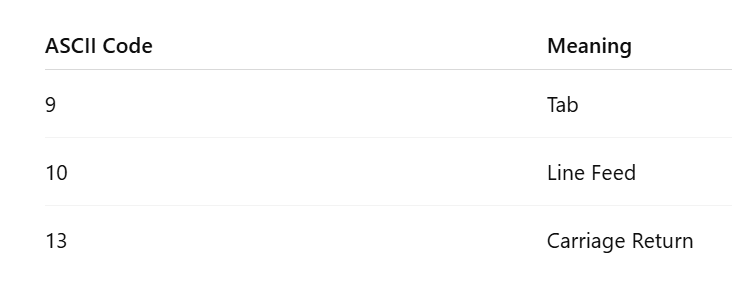
These characters often cause subtle bugs in data parsing, especially when systems handle newline characters differently.
Invisible Characters Breaking Parsing Logic
Some of the most frustrating debugging sessions involve hidden ASCII characters.
Examples include:
trailing whitespace
invisible tabs
unexpected line breaks
These characters may not appear in normal text editors but can break parsers, scripts, and configuration files.
Why ASCII Knowledge Still Makes You a Better Developer
Developers who understand ASCII tend to debug systems faster because they can inspect raw data instead of relying only on high-level abstractions.
ASCII literacy allows developers to:
inspect raw network payloads
diagnose encoding bugs
understand protocol communication
reverse engineer data formats
debug low-level systems
In complex distributed architectures, these skills often become the difference between hours of guesswork and minutes of clarity.
The Future: ASCII Inside Modern Encoding Systems
ASCII is unlikely to disappear anytime soon.
Even modern technologies still rely on ASCII compatibility.
Examples include:
JSON payloads
HTTP headers
command-line interfaces
configuration files
programming language syntax
ASCII functions as a universal baseline encoding, ensuring that basic text communication works across systems regardless of platform, language, or architecture.
Conclusion: ASCII Is the Debugging Language of the Internet
ASCII may be one of the oldest standards in computing, but it continues to play a crucial role in modern development.
Developers do not debug ASCII because it is new or powerful. They debug it because it is simple, universal, and reliable.
When systems fail, data becomes corrupted, or protocols behave unexpectedly, ASCII often becomes the clearest way to inspect what is really happening beneath the surface.
Understanding ASCII gives developers a deeper understanding of how text, protocols, and software systems actually work.
And in a world of increasingly complex technology stacks, that kind of foundational knowledge remains incredibly valuable.